


为配合办理工作类居留许可,外籍工作人员需按照太原市公安局出入境管理支队的材料要求,提供电子工作许可证主页面截图打印版及人员制证信息详情页打印版。上述两项材料作为申请工作类居留许可的佐证材料之一,提交至太原市公安局出入境管理支队。
To facilitate applications for residence permits for work purposes, foreign employees are required to prepare printed copies of the main page of their Electronic Work Permit and the detailed Personnel Certificate Information page, in accordance with the requirements of the Exit-Entry Administration Division of the Taiyuan Public Security Bureau. These two documents serve as supporting materials for the residence permit application and shall be submitted to the Exit-Entry Administration Division.
上述材料的电子版可通过手机上的“电子社保卡”(Electronic Social Security Card)APP及微信扫码功能获取。其中,人员制证信息详情页需通过电脑浏览器导出为PDF文件,并打印出来。
The electronic versions of these documents can be obtained using the Electronic Social Security Card app and WeChat’s QR code scanning function. The detailed Personnel Certificate Information page must be opened in a computer browser, exported as a PDF file, and printed.
一、操作准备
I. Preparation
本项操作需要使用两部能够正常联网的智能手机,以及一台可连接互联网的电脑:
The following devices are needed:
手机A(Phone A):登录本人“电子社保卡”APP,用于打开电子工作许可证页面、显示工作许可二维码。
Phone A: Log in to the Electronic Social Security Card app to access the Electronic Work Permit page and display the Work Permit QR code.
手机B(Phone B):安装微信(WeChat),用于扫描手机A上显示的工作许可二维码,并打开人员制证信息详情页面。
Phone B: Install WeChat to scan the Work Permit QR code displayed on Phone A and open the detailed Personnel Certificate Information page.
电脑(Computer):用于打开人员制证信息网页链接,将完整页面导出为PDF文件。
Computer: Open the Personnel Certificate Information webpage link and export the complete webpage as a PDF file.
如仅有一部手机,可临时借用另一部手机完成扫码操作。
If only one smartphone is available, another smartphone may be borrowed temporarily to complete the QR code scanning process.
二、具体操作步骤
II. Step-by-Step Instructions
第一步:打开电子工作许可证页面
Step 1: Open the Electronic Work Permit Page
在手机A上打开“电子社保卡”(Electronic Social Security Card)APP,登录本人账户,进入电子工作许可证页面。
On Phone A, open the Electronic Social Security Card app, log in to your personal account, and access the Electronic Work Permit page.
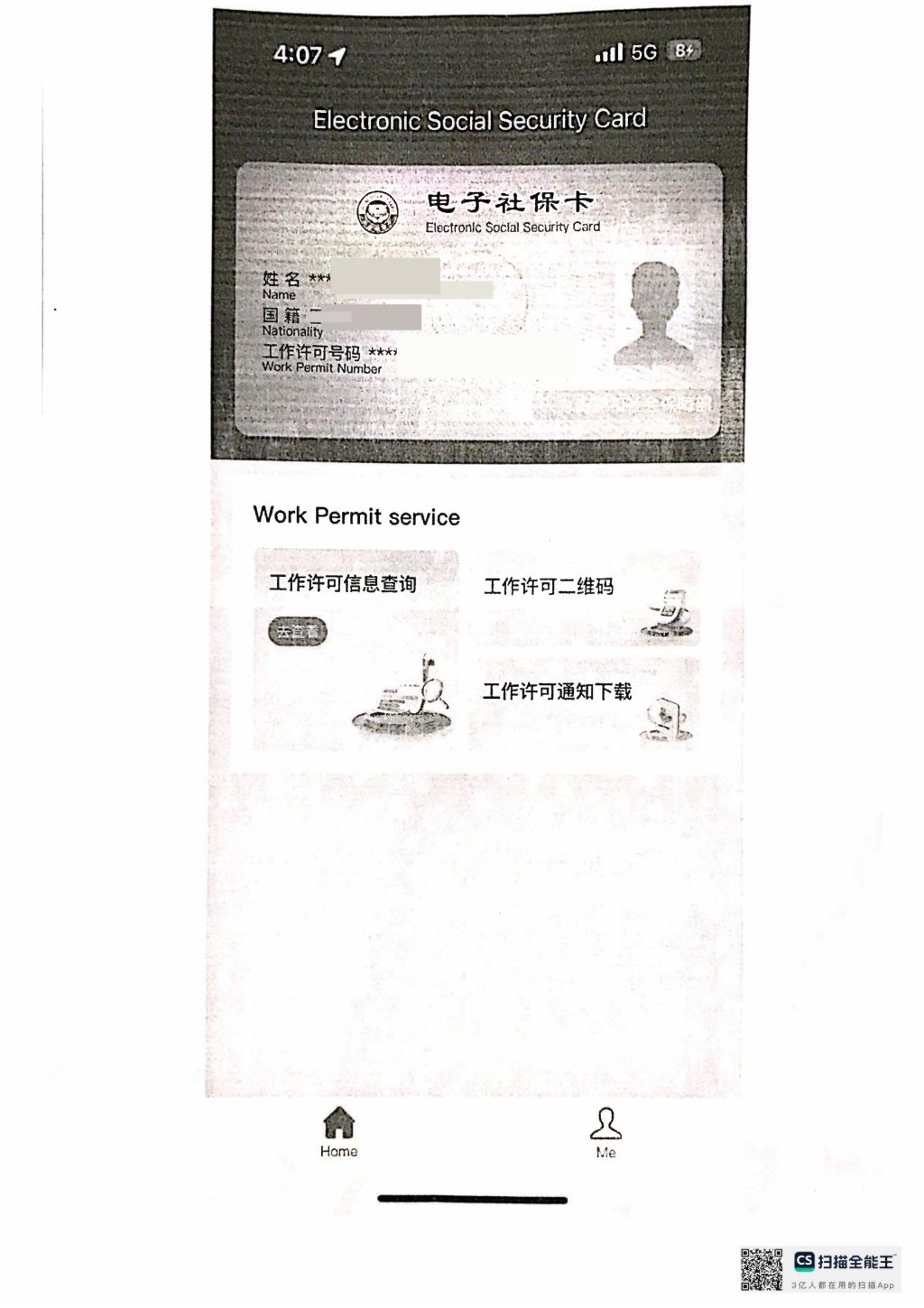
第二步:获取第一项材料——电子工作许可证主页面截图
Step 2: Obtain the First Document — Screenshot of the Main Electronic Work Permit Page
在电子工作许可证主页面,即带有本人证件照片的页面,对该页面进行截图并保存。
Then return to the main Electronic Work Permit page, which displays your personal photograph, and take a screenshot of the page. Save the screenshot for printing.
第一项材料:电子工作许可证主页面截图(带本人证件照片)。
First document: Screenshot of the main Electronic Work Permit page (showing the holder’s photograph).
示例Sample:
第三步:扫描工作许可二维码,获取人员制证信息网页
Step 3: Scan the Work Permit QR Code to Access the Personnel Certificate Information Webpage
在电子工作许可证页面中,找到并点击页面中部右侧带有相机图标的“工作许可二维码”(Work Permit QR Code)按钮,调出工作许可二维码。
On the Electronic Work Permit page, locate and tap the “Work Permit QR Code” button, which has a camera icon and is positioned toward the right-hand side of the middle section of the page, to display the QR code.
保持手机A上的工作许可二维码页面处于打开状态。
Keep the Work Permit QR code displayed on Phone A.
在手机B上打开微信,点击首页右上角“+”,选择“扫一扫”(Scan),使用手机B扫描手机A屏幕上显示的工作许可二维码。
On Phone B, open WeChat, tap the “+” icon in the upper-right corner of the home screen, select “Scan”, and scan the Work Permit QR code displayed on Phone A.
扫码成功后,手机B将通过浏览器跳转至“人员制证信息”(Personnel Certificate Information)详情页面。
After the QR code is successfully scanned, the browser on Phone B will open the detailed Personnel Certificate Information page.
第四步:将人员制证信息网页发送至电脑
Step 4: Transfer the Personnel Certificate Information Webpage Link to a Computer
由于二维码对应的网页链接具有时效性,扫码成功后应尽快将打开的人员制证信息网页链接发送至电脑。
As the webpage link associated with the QR code is time-sensitive, the link to the Personnel Certificate Information page should be transferred to a computer as soon as possible after scanning.
可通过微信文件传输助手等方式,将网页链接发送至电脑端,并在电脑浏览器中打开。
For example, WeChat File Transfer can be used to send the webpage link to the computer. Open the link in a computer browser.
注意:应尽快完成网页链接的传递和打开操作,避免因二维码或网页链接失效而无法再次访问。
Note: Transfer and open the webpage link as soon as possible to avoid losing access because the QR code or webpage link has expired.
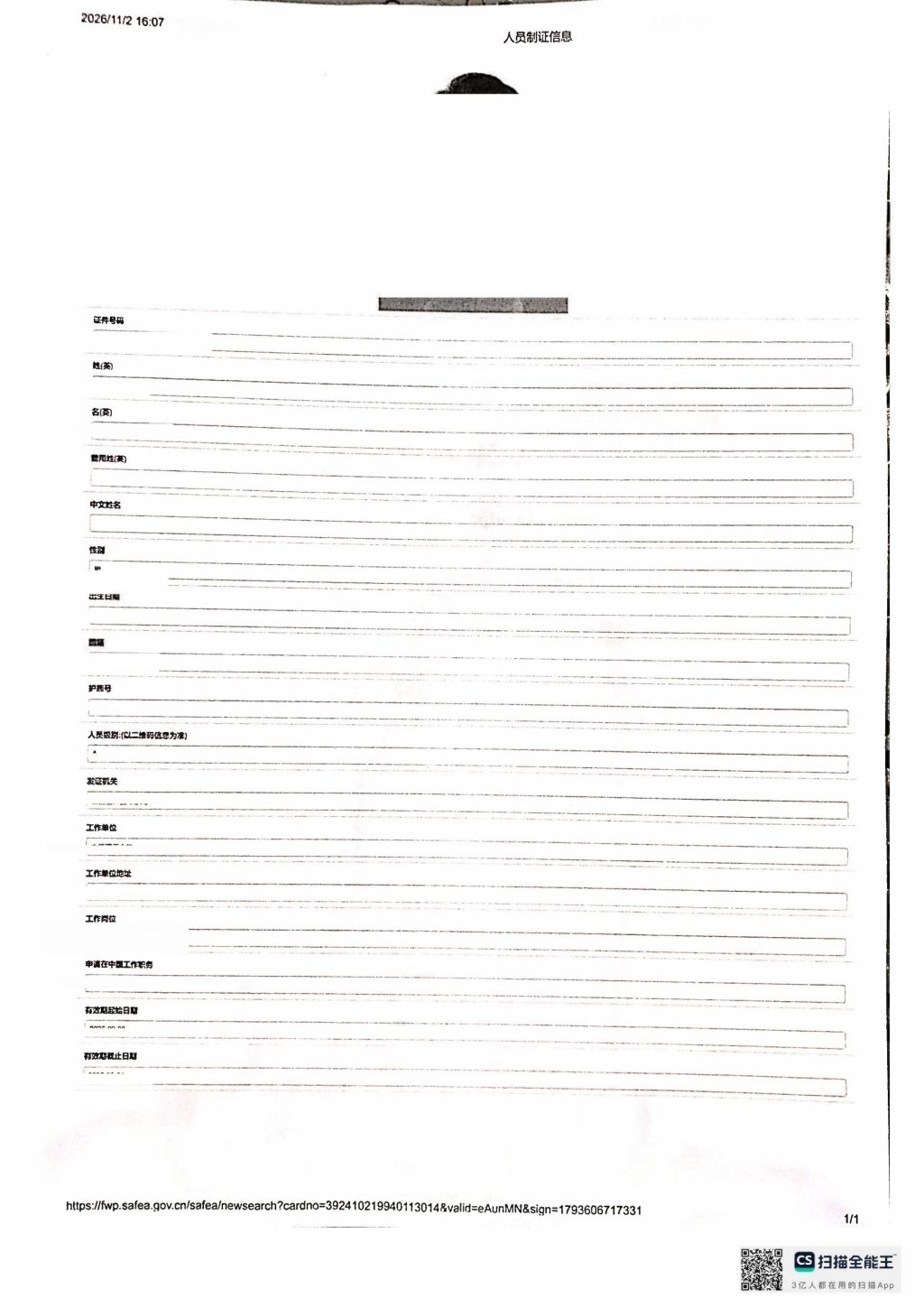
第五步:将人员制证信息详情页导出为PDF文件
Step 5: Export the Detailed Personnel Certificate Information Page as a PDF File
在电脑浏览器中打开人员制证信息详情页面,确认页面能够完整显示本人照片、证件号码、聘用单位、有效期限等相关信息。
Open the detailed Personnel Certificate Information page in a computer browser. Make sure that the page displays all relevant information, including your photograph, identification number, employing organization, and validity period.
使用浏览器的打印功能,选择“另存为PDF”或“保存为PDF”(Save as PDF),根据页面内容适当调整缩放比例及页面设置,确保人员制证信息的全部内容完整呈现在同一页PDF文件中。
Use the browser’s print function and select “Save as PDF”. Adjust the scaling and page settings as necessary to ensure that all Personnel Certificate Information is displayed completely on a single PDF page.
导出后请打开PDF文件检查,确认:
After exporting the PDF, open the file and check that:
个人照片及相关身份信息清晰可辨;
Your photograph and personal identification information are clear and legible.
聘用单位、有效期限等信息完整显示;
The employing organization, validity period, and other relevant information are displayed in full.
页面没有内容截断、遗漏或被遮挡;
No information is cut off, omitted, or obscured.
全部人员制证信息集中在同一页。
All Personnel Certificate Information appears on a single page.
第二项材料:人员制证信息详情页PDF文件(完整呈现全部信息,单页)。
Second document: PDF of the detailed Personnel Certificate Information page (all information displayed completely on a single page).
示例Sample:
| |
三、需准备的材料
III. Documents to Be Prepared
办理工作类居留许可时,需准备以下两项打印材料:
The following two printed documents are required as supporting materials for the residence permit application:
序号 No. | 材料名称 Document | 获取方式及提交形式 Method of Preparation |
1 | 电子工作许可证主页面截图打印版Printed screenshot of the main Electronic Work Permit page | 在手机A上打开本人电子工作许可证主页面,截图保存并打印。Open the main Electronic Work Permit page on Phone A, take a screenshot, save it, and print it. |
2 | 人员制证信息详情页打印版Printed detailed Personnel Certificate Information page | 使用手机B扫描工作许可二维码,将打开的网页链接发送至电脑,导出为完整的单页PDF文件并打印。Scan the Work Permit QR code using Phone B, transfer the resulting webpage link to a computer, export the complete page as a single-page PDF, and print it. |
请确保两项材料均已完整获取并打印。第二项材料应以完整的单页PDF文件打印件提交,不得仅以手机截图替代。
Please ensure that both documents have been obtained and printed. The second document must be printed from a complete single-page PDF file. A screenshot taken on a mobile phone alone is not an acceptable substitute.
[完整版示例文件参考Click to view Sample]
四、注意事项
IV. Important Notes
1. 使用两部手机完成扫码操作。一部手机用于显示工作许可二维码,另一部手机用于扫描二维码并打开人员制证信息详情页面。两部手机仅为完成上述操作所需,无须分别安装电子社保卡APP。
1. Two smartphones are required for the QR code scanning process. One smartphone displays the Work Permit QR code, while the other scans the code and opens the detailed Personnel Certificate Information page. The Electronic Social Security Card app only needs to be installed on Phone A.
2. 及时传递网页链接。工作许可二维码及其对应网页链接具有时效性。扫码成功后,应尽快将人员制证信息网页链接发送至电脑并打开,避免链接失效。
2. Transfer the webpage link promptly. The Work Permit QR code and its associated webpage link are time-sensitive. After scanning the QR code, transfer the Personnel Certificate Information webpage link to a computer and open it as soon as possible to avoid link expiration.
3. 确保PDF内容完整。人员制证信息详情页应导出为单页PDF,确保全部个人信息及相关内容完整呈现。导出后应仔细检查,不得出现信息截断、遗漏或模糊不清等情况。
3. Ensure that the PDF contains all required information. The detailed Personnel Certificate Information page must be exported as a single-page PDF, with all personal and relevant information displayed in full. Check the exported file carefully to ensure that no information is cut off, omitted, or illegible.
4. 妥善保管个人信息。工作许可信息包含个人身份及聘用信息,相关截图、网页链接及PDF文件仅用于办理工作类居留许可,不应随意向无关人员发送或公开。
4. Protect personal information. Work Permit information contains personal identification and employment details. Screenshots, webpage links, and PDF files should only be used for the residence permit application and must not be shared with or disclosed to unauthorized persons.
5. 遇到操作问题及时联系。如无法登录电子社保卡APP、无法调出二维码、扫码后无法打开详情页面,或无法完整导出PDF文件,可联系所在二级单位协助核实。
5. Seek assistance if you encounter difficulties. If you cannot log in to the Electronic Social Security Card app, display the QR code, open the detailed information page after scanning, or export the complete page as a PDF, please contact your secondary unit for assistance.
工作类居留许可的其他申请材料及具体办理要求,请参阅学校发布的《外籍工作人员工作类居留许可办理材料清单及办理指引》相关网页。
For other required documents and detailed application procedures for a residence permit for work purposes, please refer to the relevant webpage entitled “Checklist and Instructions for Applying for a Residence Permit for Foreign Employees” published by the University.
相关参考资料Related Reference
- 上一篇:IV. 来华工作外国人电子社保卡使用指南 (2024年12月1日中英文版) Guide for Foreigners Working in China on Using the Electronic Social Security Card (Chinese-English Edition, December 1, 2024) Warm reminder: The English version starts on page 15
- 下一篇:VI. 外籍工作人员居留许可办理地点与现场指引 Locations and On-site Guidance for Residence Permit Applications for Foreign Employees